Note
Go to the end to download the full example code.
Catenary#
This case simulates a rod hanging under its own weight, forming a catenary curve. The rod is fixed at both ends and is allowed to settle into its equilibrium position.
from collections import defaultdict
import numpy as np

import elastica as ea

from post_processing import (
    plot_video,
    plot_catenary,
)
Simulation Setup#
We define a simulator class that inherits from the necessary mixins.
class CatenarySimulator(
    ea.BaseSystemCollection, ea.Constraints, ea.Forcing, ea.Damping, ea.CallBacks
):
    pass


catenary_sim = CatenarySimulator()
final_time = 30
Rod Setup#
We set up the rod parameters. This rod is affected by a gravity force.
n_elem = 500
time_step = 1e-4
total_steps = int(final_time / time_step)
rendering_fps = 20
step_skip = int(1.0 / (rendering_fps * time_step))

start = np.zeros((3,))
direction = np.array([1.0, 0.0, 0.0])
normal = np.array([0.0, 0.0, 1.0])
binormal = np.cross(direction, normal)

# catenary parameters
base_length = 1.0
base_radius = 0.01
base_area = np.pi * (base_radius**2)
volume = base_area * base_length
mass = 0.2
density = mass / volume
E = 1e4
poisson_ratio = 0.5
shear_modulus = E / (poisson_ratio + 1.0)

base_rod = ea.CosseratRod.straight_rod(
    n_elem,
    start,
    direction,
    normal,
    base_length,
    base_radius,
    density,
    youngs_modulus=E,
    shear_modulus=shear_modulus,
)

catenary_sim.append(base_rod)

# Add gravity
catenary_sim.add_forcing_to(base_rod).using(
    ea.GravityForces, acc_gravity=-9.80665 * normal
)
Damping is added to the system to help it reach a steady state.
# add damping
damping_constant = 0.3
catenary_sim.dampen(base_rod).using(
    ea.AnalyticalLinearDamper,
    damping_constant=damping_constant,
    time_step=time_step,
)
Boundary Conditions#
We fix both ends of the rod using the FixedConstraint.
# fix catenary ends
catenary_sim.constrain(base_rod).using(
    ea.FixedConstraint,
    constrained_position_idx=(0, -1),
    constrained_director_idx=(0, -1),
)
Callback#
We define a callback class to record the rod state during the simulation.
# Add call backs
class CatenaryCallBack(ea.CallBackBaseClass):
    """
    Call back function for continuum snake
    """

    def __init__(self, step_skip: int, callback_params: dict) -> None:
        super().__init__()
        self.every = step_skip
        self.callback_params = callback_params

    def make_callback(
        self, system: ea.typing.RodType, time: np.float64, current_step: int
    ) -> None:

        if current_step % self.every == 0:

            self.callback_params["time"].append(time)
            self.callback_params["step"].append(current_step)
            self.callback_params["position"].append(system.position_collection.copy())
            self.callback_params["radius"].append(system.radius.copy())
            self.callback_params["internal_force"].append(system.internal_forces.copy())

            return


recorded_history: dict[str, list] = defaultdict(list)
catenary_sim.collect_diagnostics(base_rod).using(
    CatenaryCallBack, step_skip=step_skip, callback_params=recorded_history
)
Finalize and Run#
We finalize the simulator, create the time-stepper, and run.
catenary_sim.finalize()
timestepper: ea.typing.StepperProtocol = ea.PositionVerlet()

dt = final_time / total_steps
time = 0.0
for i in range(total_steps):
    time = timestepper.step(catenary_sim, time, dt)
position = np.array(recorded_history["position"])
b = np.min(position[-1][2])
Post-processing#
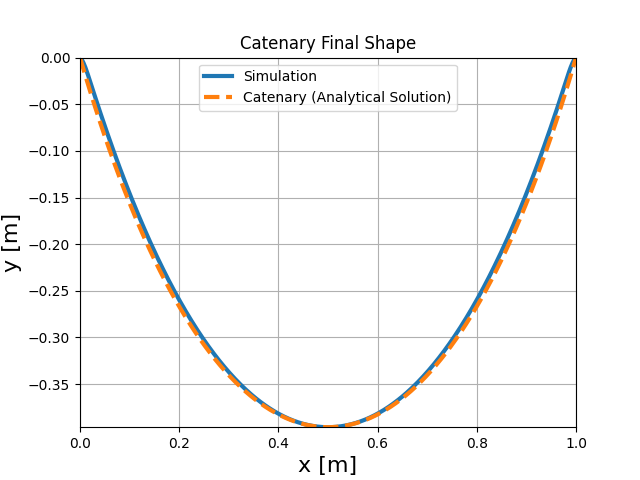
Finally, we can save a video of the simulation and plot the final shape of the catenary.
# plotting the videos
filename_video = "catenary.mp4"
plot_video(
    recorded_history,
    video_name=filename_video,
    fps=rendering_fps,
    xlim=[0, base_length],
    ylim=[-0.5 * base_length, 0.5 * base_length],
)
plot video

  0%|          | 0/600 [00:00<?, ?it/s]
  1%|          | 4/600 [00:00<00:15, 39.01it/s]
  2%|▏         | 11/600 [00:00<00:11, 52.97it/s]
  3%|▎         | 18/600 [00:00<00:10, 56.58it/s]
  4%|▍         | 25/600 [00:00<00:09, 58.67it/s]
  5%|▌         | 31/600 [00:00<00:09, 58.18it/s]
  6%|▌         | 37/600 [00:00<00:09, 57.59it/s]
  7%|▋         | 44/600 [00:00<00:09, 58.96it/s]
  8%|▊         | 50/600 [00:00<00:12, 43.60it/s]
  9%|▉         | 55/600 [00:01<00:12, 43.08it/s]
 10%|█         | 60/600 [00:01<00:12, 43.73it/s]
 11%|█         | 65/600 [00:01<00:11, 45.19it/s]
 12%|█▏        | 70/600 [00:01<00:12, 43.29it/s]
 12%|█▎        | 75/600 [00:01<00:11, 45.01it/s]
 14%|█▎        | 81/600 [00:01<00:10, 48.09it/s]
 14%|█▍        | 87/600 [00:01<00:10, 48.75it/s]
 15%|█▌        | 92/600 [00:01<00:10, 48.96it/s]
 16%|█▋        | 98/600 [00:01<00:09, 50.42it/s]
 17%|█▋        | 104/600 [00:02<00:10, 48.62it/s]
 18%|█▊        | 110/600 [00:02<00:09, 49.55it/s]
 19%|█▉        | 115/600 [00:02<00:10, 48.14it/s]
 20%|██        | 121/600 [00:02<00:09, 49.40it/s]
 21%|██        | 126/600 [00:02<00:09, 48.33it/s]
 22%|██▏       | 131/600 [00:02<00:09, 48.31it/s]
 23%|██▎       | 136/600 [00:02<00:09, 48.61it/s]
 24%|██▎       | 141/600 [00:02<00:09, 48.76it/s]
 24%|██▍       | 146/600 [00:02<00:09, 48.50it/s]
 25%|██▌       | 152/600 [00:03<00:08, 49.83it/s]
 26%|██▌       | 157/600 [00:03<00:08, 49.63it/s]
 27%|██▋       | 163/600 [00:03<00:08, 52.44it/s]
 28%|██▊       | 169/600 [00:03<00:08, 53.44it/s]
 29%|██▉       | 175/600 [00:03<00:07, 54.69it/s]
 30%|███       | 181/600 [00:03<00:07, 53.72it/s]
 31%|███       | 187/600 [00:03<00:07, 54.23it/s]
 32%|███▏      | 193/600 [00:03<00:07, 54.38it/s]
 33%|███▎      | 199/600 [00:03<00:07, 52.00it/s]
 34%|███▍      | 205/600 [00:04<00:07, 52.54it/s]
 35%|███▌      | 211/600 [00:04<00:07, 51.39it/s]
 36%|███▌      | 217/600 [00:04<00:07, 52.75it/s]
 37%|███▋      | 223/600 [00:04<00:07, 53.31it/s]
 38%|███▊      | 229/600 [00:04<00:06, 53.59it/s]
 39%|███▉      | 235/600 [00:04<00:06, 54.02it/s]
 40%|████      | 241/600 [00:04<00:06, 54.84it/s]
 41%|████      | 247/600 [00:04<00:06, 54.58it/s]
 42%|████▏     | 254/600 [00:04<00:06, 55.90it/s]
 43%|████▎     | 260/600 [00:05<00:06, 56.27it/s]
 44%|████▍     | 266/600 [00:05<00:05, 56.03it/s]
 45%|████▌     | 272/600 [00:05<00:05, 56.04it/s]
 46%|████▋     | 278/600 [00:05<00:05, 54.53it/s]
 47%|████▋     | 284/600 [00:05<00:06, 49.34it/s]
 48%|████▊     | 290/600 [00:05<00:06, 49.08it/s]
 49%|████▉     | 296/600 [00:05<00:06, 49.99it/s]
 50%|█████     | 302/600 [00:05<00:05, 50.22it/s]
 51%|█████▏    | 308/600 [00:06<00:05, 51.15it/s]
 52%|█████▏    | 314/600 [00:06<00:05, 52.03it/s]
 53%|█████▎    | 320/600 [00:06<00:05, 52.80it/s]
 54%|█████▍    | 326/600 [00:06<00:05, 53.18it/s]
 55%|█████▌    | 332/600 [00:06<00:04, 54.29it/s]
 56%|█████▋    | 338/600 [00:06<00:04, 55.06it/s]
 57%|█████▋    | 344/600 [00:06<00:04, 56.00it/s]
 58%|█████▊    | 350/600 [00:06<00:04, 55.33it/s]
 59%|█████▉    | 356/600 [00:06<00:04, 56.11it/s]
 60%|██████    | 362/600 [00:06<00:04, 56.98it/s]
 61%|██████▏   | 368/600 [00:07<00:04, 56.87it/s]
 62%|██████▏   | 374/600 [00:07<00:03, 56.74it/s]
 63%|██████▎   | 380/600 [00:07<00:03, 57.03it/s]
 64%|██████▍   | 386/600 [00:07<00:03, 55.85it/s]
 65%|██████▌   | 392/600 [00:07<00:03, 56.31it/s]
 66%|██████▋   | 398/600 [00:07<00:03, 56.21it/s]
 67%|██████▋   | 404/600 [00:07<00:03, 56.43it/s]
 68%|██████▊   | 410/600 [00:07<00:03, 57.27it/s]
 69%|██████▉   | 416/600 [00:07<00:03, 57.18it/s]
 70%|███████   | 422/600 [00:08<00:03, 56.26it/s]
 71%|███████▏  | 428/600 [00:08<00:03, 57.06it/s]
 72%|███████▏  | 434/600 [00:08<00:02, 55.66it/s]
 73%|███████▎  | 440/600 [00:08<00:02, 54.79it/s]
 74%|███████▍  | 446/600 [00:08<00:02, 54.36it/s]
 75%|███████▌  | 452/600 [00:08<00:02, 55.11it/s]
 76%|███████▋  | 458/600 [00:08<00:02, 54.21it/s]
 77%|███████▋  | 464/600 [00:08<00:02, 53.32it/s]
 78%|███████▊  | 470/600 [00:08<00:02, 52.29it/s]
 79%|███████▉  | 476/600 [00:09<00:02, 53.02it/s]
 80%|████████  | 482/600 [00:09<00:02, 53.89it/s]
 81%|████████▏ | 488/600 [00:09<00:02, 54.86it/s]
 82%|████████▏ | 494/600 [00:09<00:01, 55.19it/s]
 83%|████████▎ | 500/600 [00:09<00:01, 54.27it/s]
 84%|████████▍ | 506/600 [00:09<00:01, 53.55it/s]
 85%|████████▌ | 512/600 [00:09<00:01, 55.02it/s]
 86%|████████▋ | 518/600 [00:09<00:01, 54.06it/s]
 87%|████████▋ | 524/600 [00:09<00:01, 53.72it/s]
 88%|████████▊ | 530/600 [00:10<00:01, 53.13it/s]
 89%|████████▉ | 536/600 [00:10<00:01, 53.28it/s]
 90%|█████████ | 542/600 [00:10<00:01, 53.86it/s]
 91%|█████████▏| 548/600 [00:10<00:00, 53.05it/s]
 92%|█████████▏| 554/600 [00:10<00:00, 52.95it/s]
 93%|█████████▎| 560/600 [00:10<00:00, 52.38it/s]
 94%|█████████▍| 566/600 [00:10<00:00, 51.85it/s]
 95%|█████████▌| 572/600 [00:10<00:00, 51.63it/s]
 96%|█████████▋| 578/600 [00:10<00:00, 51.83it/s]
 97%|█████████▋| 584/600 [00:11<00:00, 51.73it/s]
 98%|█████████▊| 590/600 [00:11<00:00, 52.23it/s]
 99%|█████████▉| 596/600 [00:11<00:00, 53.00it/s]
100%|██████████| 600/600 [00:11<00:00, 52.68it/s]
plotting the catenary positions after simulation.
plot_catenary(
    recorded_history,
    xlim=(0, base_length),
    ylim=(b, 0.0),
)
Total running time of the script: (0 minutes 47.772 seconds)